How to Use LinkedIn to Find a Job in the UK
Having a well-optimised LinkedIn profile and actually using LinkedIn effectively to find a job are two different skills, and it’s entirely possible to have the first without the second — a strong profile that nobody’s actively searching with won’t find you a role on its own. This is a practical guide to actively using LinkedIn as a job search tool: the search and alert features worth setting up properly, how to use the platform’s networking side deliberately, and where it fits alongside more direct job searching.
Setting up job search alerts properly
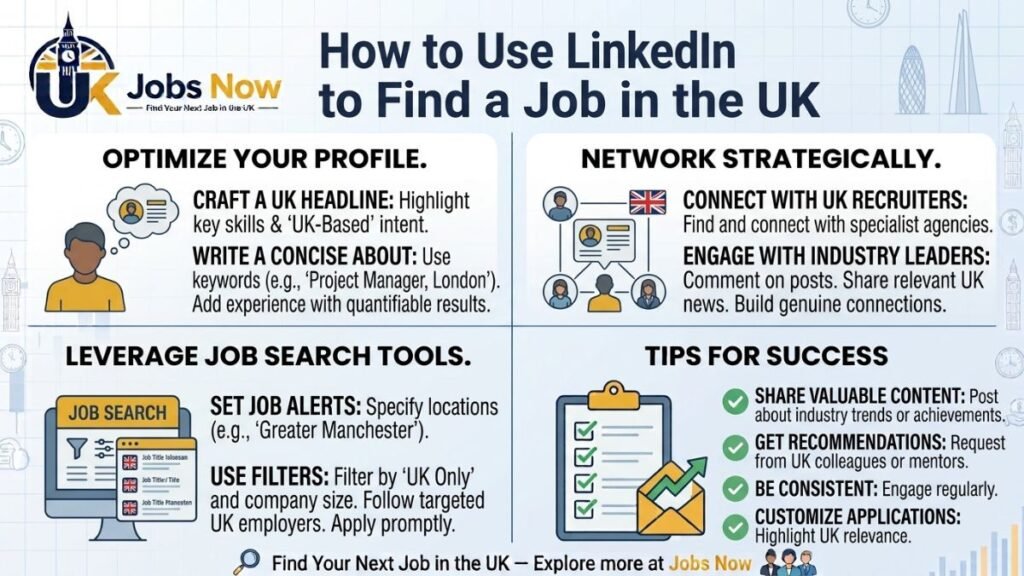
LinkedIn’s job search function lets you save specific searches and receive alerts when new matching roles are posted — but the quality of what you get out of this depends heavily on how specifically you set it up. A broad, unfiltered search (“Marketing jobs in the UK”) will flood you with a high volume of loosely relevant results. Narrowing by specific job title variations, location, seniority level, and company size or type produces a smaller, more genuinely useful stream of alerts you’ll actually read properly rather than skim past or ignore after the first week.
Using the “Easy Apply” feature wisely
LinkedIn’s Easy Apply function lets you apply to a listing using your LinkedIn profile directly, without leaving the platform or uploading a separate CV in some cases. It’s genuinely convenient, but it’s worth being deliberate about when to use it versus applying directly through a company’s own careers page — Easy Apply applications can sometimes receive less individual attention than applications made through more deliberate channels, partly because the low friction of applying means employers often receive a higher volume of less-targeted applications through this route. For roles you’re genuinely serious about, it’s often worth the extra few minutes to apply properly through the employer’s own site with a tailored CV and cover letter, even if LinkedIn’s Easy Apply option is available.
Following companies and understanding when they’re hiring
Following specific companies you’re interested in — not just connecting with individuals — surfaces their job postings and company updates directly in your feed, which can flag opportunities before they’re widely advertised elsewhere, or give you useful context (recent funding, expansion, leadership changes) ahead of an application or interview. If you have a genuine shortlist of target employers, following them directly is a low-effort way to stay ahead of new postings rather than relying purely on generic search alerts.
Using LinkedIn’s networking features deliberately, not passively
A significant proportion of roles are filled at least partly through referral or direct connection rather than purely open applications, which makes LinkedIn’s networking function genuinely relevant to a job search, not just a professional courtesy. A few specific, deliberate uses:
- Checking for existing connections at a target company before applying — LinkedIn shows you shared or first-degree connections at most companies, and a brief, genuine message asking about their experience there (not directly asking them to refer you, at least not immediately) can provide useful insight and occasionally lead to a natural introduction.
- Reaching out to people in roles similar to what you’re targeting for a brief, informal conversation about their experience — this works best framed genuinely as interest in their path, not as a disguised job request.
- Engaging thoughtfully with content from your target industry — commenting genuinely on posts from people at companies you’re interested in keeps you visible to their network over time, in a way that a single connection request doesn’t.
How to message someone you don’t know without it feeling awkward
A common hesitation is not knowing how to reach out to someone you haven’t met without it feeling presumptuous. A short, specific, low-pressure message tends to work better than a long, generic one: “Hi [Name], I noticed you work in [specific area] at [Company] — I’m currently exploring opportunities in this space and would love to hear briefly about your experience there, if you ever have a few minutes.” This is specific, low-commitment for the other person, and doesn’t ask for anything they’d need to think hard about before agreeing to.
LinkedIn versus direct job board searching: using both properly
| Approach | Strength | Limitation |
|---|---|---|
| LinkedIn job search and alerts | Wide coverage, networking context, company updates alongside listings | High volume of Easy Apply competition on some listings; not every employer posts here |
| Direct job board search (e.g. this site) | Focused, active listings with clear application links, less noise | Requires actively searching rather than relying on passive alerts alone |
| Direct company careers pages | Most current, complete listing detail; often the actual application destination regardless of where you first saw the role | Requires already having a specific target company in mind |
These aren’t competing approaches — a genuinely effective search generally uses more than one channel, since no single source reliably surfaces every relevant opportunity. You can pair active LinkedIn use with browsing current active UK job listings directly, since not every role that’s a strong fit will necessarily surface through LinkedIn’s algorithm or your specific network.
Keeping your activity focused rather than scattered
It’s easy for LinkedIn to become a source of unfocused scrolling that feels productive without actually advancing your search — reading industry content and engaging casually has some value, but it’s worth being honest about how much of your LinkedIn time is genuinely targeted job search activity versus passive browsing. A useful habit: set a specific, time-boxed session for LinkedIn job search activity (checking alerts, reviewing new connections, sending a small number of genuine outreach messages) rather than letting it blend indefinitely into general browsing.
Once your profile itself is in good shape
Everything covered here assumes your underlying profile is already solid enough to make a good impression once someone does look at it — if you haven’t already worked through this, our guide to optimising your LinkedIn profile for UK job seekers covers headline, photo, About section, and Open to Work settings in depth, and is worth doing before investing heavily in the active search strategies covered here.
Using LinkedIn’s job insights and company data as research, not just search
Beyond the search and networking functions already covered, LinkedIn’s company pages carry genuinely useful research data worth checking before applying or interviewing — employee headcount and growth trends, recent hires into the specific team you’d be joining, and posts from current employees that can give a more candid sense of the company’s culture than its own official careers page marketing copy. This kind of research is easy to skip but genuinely strengthens both your application targeting and your interview preparation, since it lets you ask more specific, informed questions than a candidate who’s only looked at the job listing itself.
Handling recruiter messages you receive through LinkedIn
An active, well-optimised profile often attracts inbound messages from recruiters, not just outbound searching on your part. It’s worth responding to genuinely relevant ones professionally and promptly, even if you’re not immediately interested, since a polite decline (“Thanks for reaching out — not quite the right fit for me at the moment, but I appreciate you thinking of me”) keeps the relationship open for a better-matched opportunity later, rather than simply ignoring messages that don’t excite you at first glance. For messages that are clearly generic and untargeted — a vague message with no specific reference to your actual background — it’s reasonable to be more selective about which ones warrant a full reply.
Frequently Asked Questions
Is Easy Apply worth using, or should I always apply directly on a company’s site?
It depends on how serious you are about the specific role — Easy Apply is convenient and reasonable for a broader, exploratory search, but for roles you’re genuinely targeting, applying directly through the employer’s own careers page with a tailored CV and cover letter often receives more individual attention.
How specific should my LinkedIn job alerts be?
Specific enough that you’ll actually read every alert properly — narrow by job title variations, location, and seniority level rather than leaving a broad, unfiltered search that generates too much low-relevance volume to engage with meaningfully.
Is it appropriate to message someone I don’t know on LinkedIn about a job?
Yes, provided the message is short, specific, and low-pressure — genuine interest in their experience or path tends to land better than a message that immediately asks for a referral or job lead before any relationship has been established.
Should I rely on LinkedIn alone for my job search?
No — it’s a genuinely useful channel, but not every relevant role or employer will surface through it. Combining LinkedIn with direct job board searches and company careers pages generally produces a more complete picture of what’s actually available.
How much time should I spend on LinkedIn during a job search?
Enough for it to be genuinely useful, but it’s worth being deliberate about time-boxing focused job search activity (alerts, outreach, application) separately from more passive browsing, which can otherwise consume significant time without meaningfully advancing your search.